Welcome to our Blog

 Seeking to build community, connection and create powerful learning experiences, the Yonkers Public School librarians are collaborating with high school content teachers to implement a trans disciplinary project encompassing math, science and social studies. Since most of children are not receiving in person instruction, many students are disenfranchised, out of touch and somewhat depressed with the current health restrictions and social distancing requirements. They do not feel connected and life is all about connection.


This project will directly draw upon the expertise and participation of four veteran teachers, who each specialize in a different academic focus. Project Geocache will foster research skills, reinforce content knowledge and teach advanced technology proficiency.  By writing about their quarantine experiences, emotions and outlook on the world, students will create personalized primary sources to be shared now and forever. 


Please check back for photos, updates and complete projects. Daniel A. Sabol

Students making items with the Glowforge Etcher

Here you will see two students learning how to use the Glowforge for finding the most caches. 


Students Discussing the Pandemic


Completing Writing Projects

Samples of the completed project. Students were asked about the pandemic and how they felt.


Student finding Geolocated caches

Student Working on finding caches throughout the Gorton High School Library.


Our first cache find with GPS coordinates:

.


Our Second cache find with GPS coordinates:
 

The students had a lot of fun with this project. They were given the coordinates of hidden items and were able to find all hidden caches.

Learning Our Coordinates and the Math

Our coordinates were 40.9500° N, 73.8890° W - Gorton High School

About a week ago our students learned what coordinates are and how they are used.  It was explained that the lines of latitude and longitude comprise an imaginary grid that has been placed over the globe.

  • The lines that run across the grid -- the flat lines -- are lines of latitude. The Equator is an example of a line of latitude. The Equator is the latitude line that divides Earth into two hemispheres, the northern hemisphere and the southern hemisphere. The Equator is the 0 point of latitude. Latitude lines North of the Equator are referred to as North latitude; latitude lines South of the Equator are referred to as South latitude.
  • The lines that run up and down on the grid -- the tall lines -- are lines of longitude. The lines of longitude are also called meridians. The Prime Meridian, which passes through Greenwich, England, is the longitude line that divides Earth into two hemispheres, the eastern hemisphere and the western hemisphere. The Prime Meridian is the 0 point of longitude. Longitude lines East of the Prime Meridian are referred to as East longitude; longitude lines West of the Prime Meridian are referred to as West longitude.
The students looked at a map and globe to get a better idea of the concept. One of the most common ways to calculate distances using latitude and longitude is the haversine formula, which is used to measure distances on a sphere. This method uses spherical triangles and measures the sides and angles of each to calculate the distance between points. It was traditionally utilized in pre-digital navigation and is based on calculations that take into account the earth’s radius, as well as the fact that on a sphere shapes are different from their flat counterparts. Namely, spheres do not have parallel lines, and lines are considered “great circles” so any two lines will intersect at two points.


These equations can be carried out manually—with some difficulty—but today, there are several easy ways to calculate distances digitally, assuming you have the correct data, to begin with. This includes knowing the start and end point (they can be the cities, streets, or even smaller distances), as well as the geographical coordinates of each point. For example, if you measured the distance between New York and Tokyo, their respective coordinates would be as follows:

  • New York (latitude 40.7128°N, longitude 74.0060°W)
  • Tokyo (latitude 35.6895°N, longitude 139.6917°E)

Keep in mind that for calculation purposes, southern latitudes can be expressed as negative numbers, as can western longitudes. With these numbers in hand, you can plug them into the haversine formulae,

a = sin²(Δφ/2) + cos φ1 ⋅ cos φ2 ⋅ sin²(Δλ/2)

c = 2 * atan2( √a, √(1−a) )

d = R * c

Where φ represent the latitudes, and λ represent the longitudes.

Alternatively, you can use a latitude and longitude calculator, which uses an algorithm based on the formula to find the distance.

What is the calculation useful for?

In the pre-GPS and computer days, the haversine formula was a vital aspect of finding the most efficient distance between two points. Today, this calculation is still important, and it plays a major role in several industries.

For logistics, where distance and time can be the difference between profits and losses, finding the shortest possible point between two locations can greatly improve travel times and reduce wasted resources. More importantly, it can help calculations that feature several moving parts. For instance, an airline that has to fly between two locations with a layover can find the most efficient path to fly, reducing jet fuel use, time that a single airplane is occupied, and increase the number of flights possible in a day. Even for delivery services, it can assist companies with planning the best possible routes for their teams to travel while reducing overall transit times, improving delivery speeds, and generating revenues.

While pen and paper calculations are time-consuming—and not entirely necessary—understanding how to calculate distances using latitude and longitude can help any company identify better routes to cut down the distances their planes, ships, cars, and teams must travel.

These equations can be carried out manually—with some difficulty—but today, there are several easy ways to calculate distances digitally, assuming you have the correct data, to begin with. This includes knowing the start and end point (they can be the cities, streets, or even smaller distances), as well as the geographical coordinates of each point. For example, if you measured the distance between New York and Tokyo, their respective coordinates would be as follows:

  • New York (latitude 40.7128°N, longitude 74.0060°W)
  • Tokyo (latitude 35.6895°N, longitude 139.6917°E)

Keep in mind that for calculation purposes, southern latitudes can be expressed as negative numbers, as can western longitudes. With these numbers in hand, you can plug them into the haversine formulae,

a = sin²(Δφ/2) + cos φ1 ⋅ cos φ2 ⋅ sin²(Δλ/2)

c = 2 * atan2( √a, √(1−a) )

d = R * c

Where φ represent the latitudes, and λ represent the longitudes.

Alternatively, you can use a latitude and longitude calculator, which uses an algorithm based on the formula to find the distance.

Our Project


Seek and you shall find, maybe? 

Subject:Technology
Grade span:7 to 12
Duration:2-3 sessions of 60-90 minutes each 
Description:
In this lesson, students locate objects hidden in our library using a handheld Global Positioning System (GPS) receiver. This geography-based approach to problem-solving, called geocaching, is a fun and engaging way to evaluate students' understanding of longitude and latitude, global navigation, and the Global Positioning System. It also tests their ability to manipulate technology. 

Learning Goals:

  • Enhance and extend students' understanding of global geography
  • Increase visual acuity
  • Develop technology skills using handheld Global Positioning System (GPS) receivers
  • Develop the ability to use our GloForge engraving tool to make the items that will be hidden and geolocated. 

Materials:

  • Computers with Internet access
  • Digital projector 
  • Handheld Cell with camera access 
  • Paper and pencil for field notes and journal entries
  • Objects to hide in caches (for example, Mr. Potato Head parts, other trinkets)
  • GloForge etching system. 

Preparation:

I will determine students' understanding of longitude and latitude and their technology skill. I will teach the students the ideas behind longitude and latitude. In addition we will briefly look at the mathematics used before we had GPS systems.
  • Become familiar with your GPS in your phone. 
  • Create caches and either report them to the Geocaching Web site registry, or record coordinates manually
Introduce students to geocaching
  • Using a computer with Internet access and projector, students will access the Geocaching Web site (www.geocaching.com) and be provide an overview of this worldwide recreational activity.
  • Generate and build on student interest by entering your location to see what caches might be nearby.
  • If possible, arrange to take students to look for one of the caches registered on the Web 
To do:
  • Before the session begins, students create several caches in the library. Record the coordinates from the GPS. 
  • Divide students into groups of three, with one GPS receiver per group. In order to involve each student, assign roles, such as GPS handler, logbook keeper, and photographer (if you use cameras). Change roles so that everyone has a chance to use the GPS receiver and enter coordinates.
  • Give each group coordinates to a cache and have them find it. Document the search using notes and photos (optional).
Coming back together 
  • Discuss the geocaching activity.
  • Have students write a description of the experience on a computer, including search coordinates they used, and any photos of their find. In addition how this project has helped them come together after the pandemic and make new friends. 
  • If this was a registered cache, have students make an entry in the Geocaching Web site.

Evaluate (Outcomes to look for):

  • Understanding of plotting techniques and geographical terminology, including latitude and longitude
  • Comfort using technology tools, including the Internet and handheld Global Positioning System (GPS) receivers to enhance learning
Last

Students will write about how they felt during the pandemic and how the creations they made with the GloForge match with the feeling that they felt when they were isolated at home. They will then discuss how finding the creations they made and found using the GPS system has reconnected them. In addition they will talk about how they feel now that they are doing something fun with others, but also represents isolation as they find the plotted items they made. 


Some of the tools used for the project

Here are some of the tools we used to create our caches. In its simplest form, a cache always contains a logbook or log sheet for you to log your find. Larger caches may contain a logbook and any number of items. These items turn the adventure into a true treasure hunt. You never know what the cache owner or visitors to the cache may have left for you to enjoy. Remember, if you take something, leave something of equal or greater value in return. It is recommended that items in a cache be individually packaged in a clear, zipped plastic bag to protect them from the elements.

https://www.geocaching.com helped with logs, geographic location and the biggest item, the clue that students had to decode.


This picture shows a screen on the GPS device. Most of us used our phone, but we did have one GPS.


 This is the Glowforge. It allowed students to etch items that they felt reminded them of the pandemic.


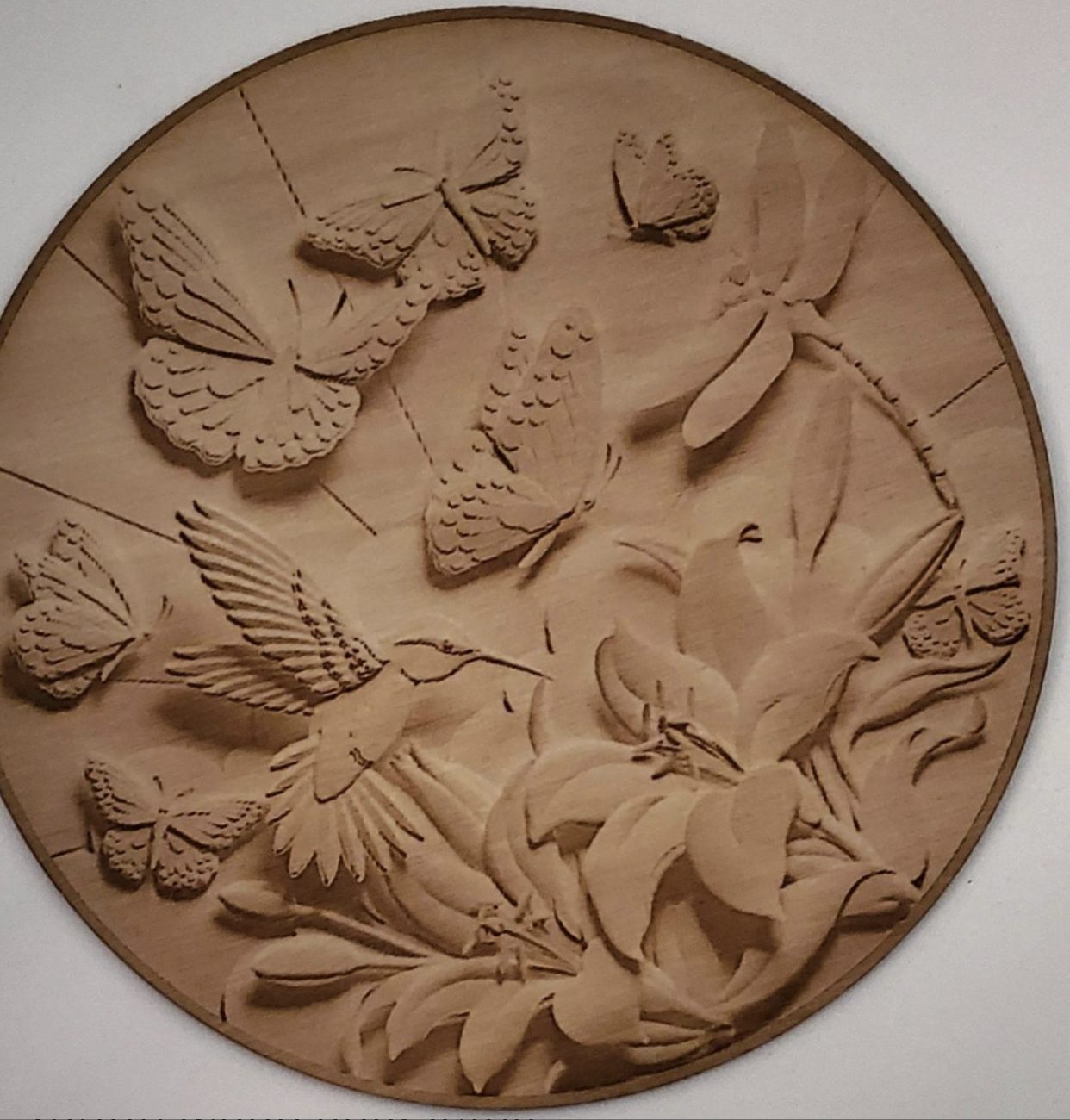
Below is an etched piece of wood that was completed with the Glowforge etcher. It has butterflies, birds and a flower. This student had "remembered, just like a butterfly has to become a chrysalis before it is released, in the pandemic we were kept in our chrysalis until things got better."


This etch was done by our librarians before this project started, but it had to be posted to show school spirit!


We also used the Maker Bot to 3D print items. The item you see printed in blue is in the shape of a key, that was a key chain. This student put her name on the key.  The key reminded her of going out and coming home prior to the pandemic. "We didn't really use keys when we were in lock down.You take for granted little things like a key when you cannot use them."


The Decryption Challange and Hint

 Students have to try and solve the encrypted message which will give them a clue to find a cache.


Decryption Key

A|B|C|D|E|F|G|H|I|J|K|L|M
-------------------------
N|O|P|Q|R|S|T|U|V|W|X|Y|Z

(letter above equals below, and vice versa)


Decrypt:

Zbfg vgrzf ner uvqqra va gur aba-svpgvba nern.


Try to solve it. Remember you worked through a pandemic. You can solve this!